
Introduction
The Hostinger vs SiteGround comparison isn’t simply a question of which company is the “better” web host. They target many of the same WordPress and small-business customers, but their pricing, control panels, hosting technology and approach to support are quite different.
I’ve worked with a number of hosting companies over the years while building and managing websites, and one thing I’ve learned is that the cheapest hosting isn’t necessarily the best value — but paying more doesn’t automatically give you a better website either.
Hostinger particularly appeals to people looking for affordable, straightforward hosting and an easy way to get a website online. SiteGround sits further toward the premium end of the shared and managed WordPress hosting market, with its own hosting tools, performance technology and support ecosystem.
So which should you choose?
In this Hostinger vs SiteGround 2026 comparison, I’ll look at pricing, renewal costs, performance, WordPress hosting, ease of use, customer support, security, backups and scalability. More importantly, I’ll explain which host I think makes more sense for different types of website owners.
The short version: I wouldn’t choose between Hostinger and SiteGround based on the introductory price alone. I’d choose according to the website you’re actually building, how comfortable you are managing hosting, and what you expect that website to need over the next few years.
Quick Verdict (If You Want It Fast)
- Choose Hostinger if you want affordable, beginner-friendly hosting
- Choose SiteGround if you want premium performance and support
Pricing Comparison: Hostinger
- Very affordable starting plans
- Great for beginners and small websites
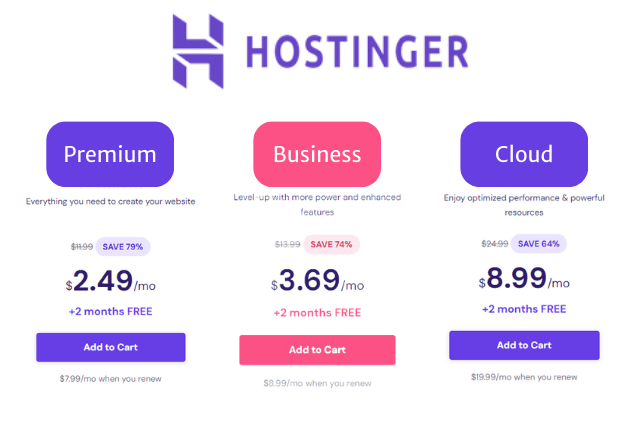
Hostinger’s biggest attraction is usually its entry price. For someone launching a first website, blog or small business site, it can provide a lot of hosting for a relatively modest initial outlay.
The important thing, however, is not to judge Hostinger purely by the promotional price. The price you pay can depend on the length of the hosting term you choose, and renewal pricing may be higher than the introductory offer. I always recommend checking the total cost over several years rather than comparing only the number displayed most prominently on the sales page.
SiteGround
- Higher starting price
- Premium features and performance
SiteGround generally sits at a higher price point, but it is aimed at a slightly different buyer. You’re paying for a hosting environment that places considerable emphasis on managed WordPress features, performance tools, security and support.
SiteGround also uses introductory pricing, so again I would pay particular attention to the renewal cost. A cheaper first year doesn’t necessarily mean cheaper hosting over the lifetime of a website.
My Take
My take: I wouldn’t automatically choose Hostinger because it starts cheaper, nor SiteGround because it costs more. For a new or relatively straightforward website where keeping costs sensible matters, Hostinger is very appealing. For a business website where support, performance and the hosting environment matter more than obtaining the lowest possible price, I’d give SiteGround serious consideration.
This is one of those comparisons where I think value matters more than price.
Performance & Speed
Speed is one of the areas where the Hostinger vs SiteGround comparison becomes more interesting. Both companies put considerable emphasis on performance, but they approach it differently.
A hosting company can provide excellent infrastructure, but the speed a visitor actually experiences also depends on your WordPress setup, theme, plugins, caching, images, traffic and where your visitors are located. So I wouldn’t choose either host simply because of a headline speed claim.
Hostinger
Hostinger has built much of its appeal around providing fast hosting at an affordable price. For a typical WordPress site, small business website or blog, that combination is one of the reasons it represents such strong value.
What I particularly like about Hostinger is that you don’t necessarily need an expensive hosting plan to get a capable hosting environment. For many smaller websites, I’d rather start with sensible resources and upgrade when the website genuinely needs more.
SiteGround
SiteGround takes a more managed approach to performance. Its hosting runs on Google Cloud infrastructure and combines SSD storage with its own caching technology, CDN and WordPress optimisation tools.
SiteGround also develops a considerable amount of its performance technology itself. Its current platform includes multilevel caching, NGINX, Brotli compression and the Speed Optimizer plugin for WordPress.
For a business website where performance, reliability and managed optimisation are particularly important, those additional layers are part of what you’re paying for.
My Experience
I’ve worked with both Hostinger and SiteGround, and I wouldn’t describe either as a slow host.
My preference depends more on the website I’m building. For a straightforward website where price and performance both matter, Hostinger offers a very attractive balance.
For a more important business website, particularly one where I want a more managed hosting environment and strong performance tools available from the outset, I’d be more inclined to consider SiteGround.
The important distinction is this: Hostinger makes good performance accessible at a lower price point, while SiteGround puts more emphasis on a managed performance ecosystem.
That doesn’t mean every SiteGround website will automatically be faster than every Hostinger website. Website configuration still matters enormously.
Ease of Use
Both Hostinger and SiteGround have moved away from the traditional cPanel-style experience and developed their own hosting management systems. Both are relatively easy to use, but they feel quite different.
Hostinger – hPanel
Hostinger uses its own control panel called hPanel. It has a clean, modern interface and is clearly designed to make hosting less intimidating for people who may never have managed a website before.
Tasks such as installing WordPress, managing domains, creating email accounts, checking backups and accessing website settings are organised through a fairly visual dashboard.
For someone setting up their first website, I think this is one of Hostinger’s strengths. You don’t need to understand everything about servers or hosting before you can get started.
There is a trade-off, however. If you’re accustomed to cPanel, hPanel works differently and may take a little getting used to. That isn’t necessarily a disadvantage — it’s simply Hostinger’s own way of managing hosting.
SiteGround – Site Tools
SiteGround also uses its own hosting control panel, called Site Tools.
Site Tools provides access to areas such as domains, email, security, backups, caching, statistics and developer tools. It feels slightly more technical than Hostinger’s hPanel, but it also gives website owners a considerable amount of control.
For someone managing a business website or multiple WordPress installations, I particularly like having performance, security and website-management tools brought together within the hosting environment.
It may take a new website owner a little longer to become familiar with than Hostinger, but I wouldn’t describe SiteGround as difficult to use.
Which Is Easier: Hostinger or SiteGround?
For a complete beginner, I’d give Hostinger the edge for ease of use. hPanel is approachable and does a good job of hiding much of the complexity involved in running a website.
For someone with more experience — or someone who wants more hosting and WordPress management tools close at hand — SiteGround’s Site Tools is extremely capable.
My way of looking at it is:
- Hostinger: easier introduction to web hosting.
- SiteGround: slightly steeper learning curve, but a powerful management environment once you’re familiar with it.
Neither should be particularly difficult for an ordinary WordPress website owner.
Reliability & Uptime
Reliability is one of those hosting features that is easy to ignore until your website goes offline. For a hobby site, a short outage may simply be annoying. For a business website, online store or site generating enquiries, downtime can mean lost customers and lost revenue.
Both Hostinger and SiteGround are established hosting companies with infrastructure designed to provide high availability, but reliability isn’t determined by an uptime percentage alone. Server performance, traffic handling, backups, security, monitoring and how quickly problems are resolved all contribute to the experience.
Hostinger Reliability
Hostinger has developed considerably from the budget hosting company many people may remember from years ago. Its current hosting infrastructure includes features designed around performance and availability, and for the typical blog, small-business website or WordPress site, I would be comfortable using Hostinger.
One advantage is that Hostinger gives smaller website owners access to a relatively sophisticated hosting environment without necessarily requiring a premium hosting budget.
That said, I wouldn’t choose any hosting company solely because of an advertised uptime figure. The plan you choose, the resources available to your account and the demands of your particular website can all affect real-world performance.
SiteGround Reliability
SiteGround has traditionally positioned itself further toward the managed and premium end of the hosting market.
For a business website where reliability is particularly important, SiteGround would be high on my shortlist. Its hosting environment combines performance tools, security features, backups and managed WordPress functionality rather than treating reliability simply as a server-uptime number.
This is one of the areas where paying more for hosting can make sense — not necessarily because a more expensive host can promise that nothing will ever go wrong, but because the overall hosting environment and support available when something does go wrong become increasingly important.
Which Is More Reliable: Hostinger or SiteGround?
For most ordinary websites, I would be comfortable using either Hostinger or SiteGround.
If I were building a relatively straightforward website and wanted to keep hosting costs sensible, Hostinger would remain a strong choice.
If the website were business-critical, generating significant revenue or expected to become more demanding over time, I would lean toward SiteGround.
The distinction for me isn’t simply:
“Which company has the highest advertised uptime?”
It’s:
“Which hosting environment would I rather depend on if this website became important to the business?”
For a smaller website, my answer could easily be Hostinger. For a more important business website, I’d be inclined to pay more for SiteGround.
Customer Support: Hostinger vs SiteGround
Customer support is one of the areas I pay particular attention to when choosing hosting. When everything is working properly, the differences between hosting companies can seem relatively small. It is when a website suddenly stops working, an SSL certificate causes problems, email stops behaving properly or a migration goes wrong that good support becomes extremely valuable.
Both Hostinger and SiteGround provide customer support, but they approach the overall hosting experience somewhat differently.
Hostinger Support
Hostinger has built much of its service around making hosting relatively straightforward for people who may not have extensive technical experience.
Its hPanel control panel is designed to make many common hosting tasks easier to manage yourself, and support is available when you need additional assistance.
For someone building their first website or running a relatively straightforward WordPress site, I think this combination of an accessible control panel and support makes Hostinger appealing.
One thing worth remembering, however, is that inexpensive hosting still has to operate economically. If highly personalised technical assistance is one of your most important requirements, I wouldn’t choose a host purely because it has the lowest introductory price.
SiteGround Support
Support has traditionally been one of the reasons many website owners consider SiteGround despite its higher pricing.
SiteGround combines its support with a more managed hosting environment, which can be particularly attractive for business owners who would rather spend their time running their business than diagnosing hosting problems.
That becomes increasingly valuable as a website becomes more important.
A personal blog being unavailable for a short period is inconvenient. A business website that generates enquiries, bookings or sales being unavailable can have a genuine financial cost.
Which Has Better Support?
For a beginner or smaller website where budget matters, Hostinger offers a compelling overall package and I wouldn’t dismiss it simply because it costs less.
For a business website where support is one of my highest priorities, I would lean toward SiteGround.
But I wouldn’t make the decision on support alone. I’d consider support together with price, performance, reliability, ease of use and what the website is expected to become over the next few years.
My view: Hostinger makes a lot of sense when value and simplicity are priorities. SiteGround becomes more attractive when the website is important enough that I’m prepared to pay more for the overall managed hosting experience.
Scalability: Which Host Gives You More Room to Grow?
The hosting you need today may not be the hosting you need two or three years from now. Traffic can increase, a simple business website can become an online store, and a small WordPress site can gradually require more storage, processing power and other resources.
That’s why I prefer choosing hosting with a sensible upgrade path rather than simply buying the cheapest plan available.
Hostinger
Hostinger gives website owners several ways to move beyond basic hosting as their requirements increase. That makes it particularly attractive to someone who wants to start relatively inexpensively without necessarily committing to a more expensive hosting environment from day one.
For many small-business websites, blogs and growing WordPress sites, upgrading within Hostinger’s hosting range may provide plenty of room before a completely different type of hosting becomes necessary.
This is one of the reasons I wouldn’t regard Hostinger simply as a “beginner host”. You can start small, but that doesn’t automatically mean you have to leave as soon as the website becomes successful.
SiteGround
SiteGround also provides different levels of hosting for websites whose requirements increase over time.
Where I think SiteGround becomes particularly attractive is for website owners who want to remain within a more managed environment as their website grows. Its performance, caching, security and WordPress-management tools can become increasingly useful as a site becomes more important to a business.
However, I wouldn’t automatically assume that paying more means unlimited scalability. Every hosting platform and plan has practical resource limits, so a very large or specialised website may eventually require a different hosting architecture regardless of the company you started with.
Which Is Better for Growth?
For the typical small-to-medium website, both Hostinger and SiteGround provide room to grow.
If I wanted to start economically and increase resources as the website justified the expense, I’d be very comfortable starting with Hostinger.
If I were building a business website that I expected to become increasingly important and wanted a more managed hosting environment around it, I’d be more inclined toward SiteGround.
For genuinely resource-intensive projects, I would look beyond the brand name and consider the type of hosting required — whether that’s VPS, cloud or dedicated infrastructure.
If you’re unsure where that point occurs, my guide to Shared vs VPS vs Dedicated Hosting explains when moving beyond ordinary hosting starts to make sense.
Features Comparison
| Feature | Hostinger | SiteGround |
|---|---|---|
| Overall value | Excellent | Good for users wanting a more managed environment |
| Starting cost | Generally lower | Generally higher |
| Control panel | hPanel | Site Tools |
| Ease of use | Excellent for beginners | Easy, with more advanced tools available |
| Performance approach | Strong performance at a lower price point | Managed performance tools and optimisation |
| WordPress | Beginner-friendly WordPress hosting | Strong managed WordPress environment |
| Support | Good fit for everyday hosting needs | Strong emphasis on managed support |
| Scalability | Good upgrade path from affordable hosting | Good growth path within a managed environment |
| Best for | Beginners, blogs and value-conscious small businesses | Business sites and users prioritising managed hosting |
| My pick for | Value | Managed business hosting |
There isn’t a universal winner here. Hostinger is the one I’d lean toward when value, simplicity and keeping costs sensible are the priorities. SiteGround becomes more attractive when I’m prepared to spend more for a managed hosting environment, additional WordPress tools and support.
Security & Backups
Security and backups are easy to overlook when comparing hosting because they aren’t as exciting as speed or introductory pricing. But if a website is hacked, an update goes wrong or files are accidentally deleted, they suddenly become some of the most important features you’re paying for.
Both Hostinger and SiteGround include security and backup features within their hosting ecosystems, although exactly what is included can depend on the plan you choose. I therefore recommend checking the current plan details before buying rather than assuming every feature is included at every price level.
Hostinger Security & Backups
Hostinger provides a range of security features designed to protect websites and hosting accounts, alongside backup options that vary according to the hosting plan.
For a smaller website or someone starting out, I like the fact that much of the everyday hosting management is brought together inside hPanel. That makes tasks such as managing SSL, checking backups and accessing security-related settings less intimidating for someone who isn’t a server administrator.
The important thing is to check the backup frequency included with the particular plan you’re considering. A backup is much more useful when you know how often it is created, how long it is retained and how easily you can restore it.
SiteGround Security & Backups
SiteGround places considerable emphasis on security as part of its managed hosting environment.
Its hosting platform combines account and server-level security measures with WordPress-focused tools, while backup and restore functionality is integrated into Site Tools.
For a business website, I particularly value having backups, security and website-management tools within the same hosting environment. When something goes wrong, being able to restore a recent version of a website can be far more valuable than saving a few dollars on the hosting bill.
Which Is Better for Security and Backups?
I wouldn’t choose either provider solely because it has a longer list of security features on its sales page.
For a typical website, both Hostinger and SiteGround provide a much more complete hosting environment than simply giving you some server space and leaving everything else to you.
Hostinger remains attractive when I want good everyday hosting features while keeping costs sensible.
SiteGround would appeal more to me when the website is important enough that I want security, backups, performance tools and support to form part of a more managed overall environment.
Whichever host you choose, I would still follow one rule:
Never rely on only one backup system for an important website.
For a business-critical site, I prefer having an independent backup available as well as whatever backup system the hosting company provides.
Which One Should You Choose?
By this point, the difference between Hostinger and SiteGround should be fairly clear. Both can host an excellent website, but I would choose between them according to the type of website I’m building rather than trying to declare one company the winner for everyone.
Choose Hostinger if:
- You are building your first website.
- Keeping hosting costs sensible is important.
- You want a straightforward control panel and hosting experience.
- You’re running a blog, portfolio or small-business website.
- You want good performance without immediately moving into more expensive managed hosting.
My pick for: beginners, smaller websites and website owners who want excellent overall value.
Choose SiteGround if:
- The website is important to your business.
- You’re prepared to pay more for a managed hosting environment.
- WordPress performance and management tools are important to you.
- Support is a particularly important part of your decision.
- You expect the website to become more demanding over time.
My pick for: established business websites and website owners who place more value on a managed hosting environment than obtaining the lowest possible price.
What Would I Choose?
If I were launching a straightforward new website today and wanted to keep the initial and ongoing costs sensible, I’d be very comfortable choosing Hostinger.
If I were choosing hosting for an important business website and the additional cost wasn’t a major concern, I’d lean toward SiteGround.
That’s why I don’t think the useful answer to Hostinger vs SiteGround is simply “SiteGround wins” or “Hostinger wins.”
Hostinger wins on value for me. SiteGround wins when I want the more managed hosting environment.
Ready to Get Started?
If you’ve decided which hosting approach suits you, you can check the providers’ current plans and pricing below.
Hostinger — My Pick for Value
If you’re starting a new website, want an easy hosting environment and would prefer to keep costs sensible, Hostinger is the option I’d look at first.
View Hostinger Plans & Current Pricing →
SiteGround — My Pick for Managed Business Hosting
If the website is important to your business and you’re prepared to spend more for SiteGround’s managed hosting environment, WordPress tools and support ecosystem, take a look at its current plans.
View SiteGround Plans & Current Pricing →
Hosting prices and promotions can change. Check the provider’s current offer and renewal pricing before purchasing.
Want More Options?
Hostinger and SiteGround won’t be the right choice for everyone.
If you’d like to compare them with other hosting providers before deciding, take a look at my Top 10 Web Hosting Providers guide for a broader selection of hosting options.
If you’re specifically looking for hosting for an Australian website, you can also read my Best Web Hosting Australia (2026) guide.
There is no need to choose a host simply because it wins one comparison. The better choice is the provider that fits your website, budget and level of technical experience.
FAQs
Is Hostinger better than SiteGround?
Neither is better for every website. I prefer Hostinger when value, affordability and ease of use are the priorities. I lean toward SiteGround when I’m prepared to pay more for a more managed hosting environment, WordPress tools and support.
For a first website or smaller business site, Hostinger would often be my starting point. For an important business website where hosting is a relatively small part of the overall business cost, I’d give SiteGround serious consideration.
Which is better for beginners, Hostinger or SiteGround?
For a complete beginner, I’d give Hostinger the edge.
Its hPanel interface is approachable, and Hostinger does a good job of making many everyday hosting tasks relatively straightforward.
SiteGround isn’t difficult to use, but Site Tools provides a more extensive management environment that may take a little longer for someone completely new to hosting to become familiar with.
Which is better for a business website?
That depends on the business.
For a small business that needs a reliable website while keeping costs under control, Hostinger can offer excellent value.
For a business where the website generates important enquiries, bookings or sales and I’m prepared to spend more on the hosting environment, I’d lean toward SiteGround.
The more important the website becomes to the business, the more weight I’d give to support, backups, security and management tools rather than simply choosing the lowest-priced plan.
Is Hostinger cheaper than SiteGround?
Hostinger generally positions itself as the more affordable option, particularly for people starting a new website.
However, both companies can use introductory pricing, and hosting prices and promotions change. I recommend checking the renewal price and total cost over several years, not just the promotional price displayed when you first sign up.
Can I move from Hostinger to SiteGround — or SiteGround to Hostinger — later?
Yes. Choosing a host today doesn’t mean your website has to remain there forever.
WordPress websites can generally be migrated between hosting providers, although the process and assistance available can vary. This is another reason I prefer choosing the host that suits the website now, while still considering how the site may grow over the next few years.
Final Thoughts: Hostinger vs SiteGround — Which Would I Choose?
Hostinger and SiteGround are both hosting companies I’d be comfortable considering, but I don’t think they should be judged by exactly the same criteria.
Hostinger is my pick for value. If I were starting a new website, building a blog or small-business site, or simply wanted capable hosting without spending more than necessary, Hostinger would be very high on my list.
SiteGround is my pick for a more managed business-hosting environment. If the website were particularly important to my business and I valued its WordPress tools, performance environment and support enough to justify the additional cost, I’d lean toward SiteGround.
What I wouldn’t do is choose either company purely because of an introductory price, a headline speed claim or somebody else’s declaration that one host is universally “better”.
I’d consider what I’m building, how important the website is, how much technical involvement I want and what I’m comfortable spending over the next few years.
My Final Verdict
Choose Hostinger for: value, simplicity, beginners and cost-conscious small-business websites.
Choose SiteGround for: a more managed hosting environment, business websites and website owners prepared to pay more for that experience.
For most people launching a straightforward new website, I’d start with Hostinger.
For an established business where the website has become an important asset, I’d give SiteGround serious consideration.
Whichever you choose, remember that hosting isn’t a lifetime commitment. Pick the provider that makes sense for the website you’re building today, keep an eye on how its needs change, and upgrade or move when there’s a genuine reason to do so.